Showing posts with label EVN. Show all posts

Wednesday, May 29, 2013

Looking forward to Semtechbiz in San Francisco next week


The Semantic Technology & Business series of conferences has held successful events in London, Berlin, New York City, and Washington D.C. in the last few years, but the annual one in San Francisco is the big one. We're a silver sponsor of next week's event, where we'll be looking forward to showing everyone what we've been up to and learning more about what everyone else has been doing with standards-based semantic technology.

In the exposition hall, we'll be at booth 116, right by the exhibit hall entrance. In our booth, we'll be showing TopBraid Life Sciences Insight, a Logical Data Warehouse aimed at people in the Life Sciences industry, and TopBraid Enterprise Vocabulary Net, our standards-based multi-user vocabulary management solution. We'll also be happy to talk about any of our other products and projects.

We'll be giving four talks at the conference:

Stop by our booth or one of our talks to say hi and to tell us about what you've been doing with semantic technologies and what you hope to do. We love the opportunity that this conference gives us to learn the latest about what people are doing with semantic web standards.

Thursday, July 26, 2012

Who needs SKOS-XL? Maybe no one

The SKOS-XL extension to the W3C’s SKOS standard for vocabulary management adds flexibility in how you track concept names, but it adds complexity and potential confusion that are rarely, if ever, worth it. 

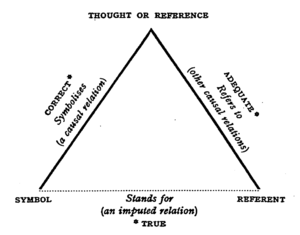
What is the appeal of SKOS-XL? Information modelers wanting to separate concepts (so-called conceptual ideas) from terms (the names people use for concepts) often base their thinking on the model of Semiotic Triangle http://en.wikipedia.org/wiki/Triangle_of_reference or Peirce’s Triangle. Sometimes also called a triangle of meaning, this philosophy distinguishes a concept that exists in a human mind—a thought—from how it is referred to and from a symbol that evokes it. 


A referent is understood as a word. A symbol is typically explained as a pictorial depiction. A key aspect of this theory is its focus on human cognition. It postulates that there can be no name or identity intrinsic to a concept as it only exists as a thought in a human mind.

The challenge of applying this thinking to information modeling is that, ultimately, in information modeling we must commit everything to paper, electronic or otherwise. Thus, every concept must have an identity and a name. As a result, a separate model for concepts and terms where terms themselves have identity, names, relationships and are tracked separately from concepts is typically an over-complication that does not deliver practical value. For one thing, even explaining to a business audience a difference between a concept and a term is not simple. Colloquially, these words are often used interchangeably. Once explained, distinguishing and keeping track of these on an ongoing basis, when both “concepts” and “terms” are more often than not named using the same words, can be mind boggling. 

SKOS takes a simpler and what we believe to be a more practical approach to information modeling. It provides a way to describe concepts by giving each one:
  •  A globally unique identity
  • A preferred label that is unique for a human language (such as English or German) within a scope of a particular “concept scheme”. It is called skos:prefLabel.
  • Any number of alternative labels called skos:altLabel. Concept's alternative labels in a given language should not be the same as its preferred label in this language.
  • Whatever other properties (attributes and relationships) are deemed necessary:
  • SKOS supplies some standard relationships such as skos:broader, skos:related and skos:exactMatch and a number of annotations that are thought to be universally useful such as skos:definition and skos:editorialNote.
  • Users of SKOS are free to add properties specific to their domain. For example, when using SKOS to describe different companies, a user may want to add a stock ticker field.

If needed, metadata about labels can be captured without giving them identity of their own. TopBraid EVN is a good example of a tool that offers this capability. Besides the language part, such metadata is typically not just about the label itself, but about its relationship to the concept—for example, who said that this is a preferred label for this concept and when. All the relationships are between concepts, not between the labels.

The W3C has published an optional extension to SKOS called SKOS-XL (SKOS eXtension for Labels) that accommodates those who want to give separate identity to concepts and terms. It does not use the word “term”—presumably, because informally terms are often understood as concepts and vice versa. Instead it introduces a class Label explained as a “lexical entity”. While the extension is small with only one new class and five new properties, its implications are far-reaching. As a result, providing tool support for SKOS-XL is considerably more complex than for SKOS proper. 

Following the SKOS-XL model, labels are not strings as in SKOS proper, but RDF resources with their own identity. Each label can have only one literal form; this is where the actual text string (the name) goes. The literal form is not one per Label per language as with SKOS’s constraint for assigning preferred labels, but one per Label. So, to accommodate different languages, different label resources must be created. At the same time, there can be multiple Label resources with the same literal form (for example, two different Label resources with the literal form “Mouse”). Even a simple SKOS-XL vocabulary is considerably bulkier than its SKOS alternative. Since SKOS-XL format takes far more more space, storage, import/export and performance of search and query can become an issue for larger vocabularies.

Concepts are connected to Labels by relationships that indicate preferred (skosxl:prefLabel) and alternative Labels (skosxl:altLabel) for a Concept. There is no cardinality restrictions on these relationships–that is, a Concept can be linked to multiple Labels using skosxl:prefLabel link. Labels can be linked to each other using skosxl:labelRelation relationship. These links are separate from the relationships between Concepts.

Direct use of SKOS properties that associate label strings with Concepts can be tricky when using SKOS-XL. According to SKOS-XL label strings for Concepts are derived using rules such as:

The property chain (skosxl:prefLabel, skosxl:literalForm) is a sub-property of skos:prefLabel

This means that if there is a Label ex:Label1 with literal form “love” and a Concept ex:Concept1 where ex:Concept1 connects to ex:Label1 using a skosxl:prefLabel relationship, we can conclude that ex:Concept1 has a skos:prefLabel  value of “love”.  Since simultaneously keeping the integrity of directly entered and inferred values is problematic, any tool supporting SKOS-XL must protect the user from directly entering label strings for Concepts. This makes it difficult to use the same tool to edit for SKOS and SKOS-XL vocabularies, especially if users want to intermix different vocabulary formats. 

Furthermore, a user will see the same text label for different entities. This will be not only because different Labels can have the same literal forms, but also because the Concept resources “inherit” string labels from the associated Label resources. This can easily lead to confusing results.

There are also various integrity clashes between SKOS and SKOS-XL. For example:

1.       Two different preferred labels in the same language

ex:Concept1skosxl:prefLabelex:Label1; skosxl:prefLabelex:Label2.
ex:Label1 skosxl:literalForm "love"@en .
ex:Label2 skosxl:literalForm "adoration"@en .

This is not “wrong” according to SKOS-XL because a Concept can be connected to multiple Labels using the skosxl:prefLabel relationship. But, it means that ex:Concept1has skos:prefLabel values of both "love"@en and "adoration"@en. This is a violation of SKOS constraint S14, which prohibits a concept from having more than one preferred label string in a given language.
2.        
      Clash between preferred and alternative labels

ex:Concept1skosxl:prefLabel ex:Label1; skosxl:altLabel ex:Label2
ex:Label1 skosxl:literalForm "love"@en .
ex:Label2 skosxl:literalForm "love"@en .

Again, this is not “wrong” according to SKOS-XL because different Labels can have the same literal form, but it’s a problem for SKOS because it implies identical English language preferred and alternative label strings for ex:Concept1.

Without a doubt, these issues play a role in the fact that while the use and tool support for SKOS is growing, there are few if any tools for SKOS-XL or published SKOS-XL vocabularies. An even more important factor is the lack of compelling business value that would justify SKOS-XL complexity. Having talked to a wide range of users working on business vocabularies, we have yet to hear a use case that cannot be supported by SKOS alone.

Does SKOS-XL look like the only viable approach to your vocabulary management needs? Let’s discuss it—maybe we can help you find a simpler solution.

Wednesday, December 29, 2010

How to: convert a spreadsheet to SKOS

In an earlier entry, we learned how SPARQL Rules can increase the quality of taxonomies and other controlled vocabularies stored using the W3C SKOS ontology. (As I wrote there, the Simple Knowledge Organization Systemvocabulary management specification is gaining popularity because, as a standard, it makes it easier to share taxonomies and thesaurii between different systems. It also guards investments in vocabulary development against the potential problems of dependence on a proprietary vendor format.)

TopQuadrant's Enterprise Vocabulary Net (EVN) vocabulary manager uses SKOS as its default format for storing data. Whether you use EVN or not, a first step in systematic management of vocabularies is often the conversion of vocabularies stored in ad hoc spreadsheets—an unfortunately very popular way to store them—to SKOS, so today we'll look at how TopBraid makes this conversion easy.

Below is an Excel spreadsheet with some data about a few Caniformia animals. (In the Linnaeus classification of animals, Caniformia is the suborder of Carnivora, which is an order of the Mammalia class.) It shows two families of this suborder and a few genuses and species of each family, with both the Latin and common name of each species.

Using a SPARQLMotion script, the basic steps of converting a spreadsheet like this to SKOS are:

  1. Read in the spreadsheet as a set of RDF triples.

  2. Use a CONSTRUCT query to convert the spreadsheet triples to SKOS triples. This is the step that varies the most from one conversion to another, because people can arrange spreadsheets any way they want, so the logic of the CONSTRUCT query has to infer the correct relationships between the values on the spreadsheet.

  3. Save the SKOS triples as an RDF file or in whatever format is appropriate to your applications that will use this data.

The following shows the SPARQLMotion script that I used to convert the spreadsheet above.

It has a module for each of the three steps listed above and an additional SetBaseURIStr module to set a ?baseURIStr variable. The script refers to the base URI of the output several times, and instead of hardcoding it in all those places, I decided to use this module to set this variable and to then reference the variable from other places so that resetting the base URI could be done in one place. The "set BaseURIString" module has a very simple SELECT query:

SELECT ?baseURIStr
WHERE {
LET (?baseURIStr := "http://example.com/taxonomies/animals") .
}

When you import an Excel file into TopBraid, the "Import Excel Cell Instances" SPARQLMotion module can pull triples from the spreadsheet with information such as the fact that a given cell has a row value of 7 (using zero-based counting), a column value of 0, a type value of "xsd:string", and "giant panda" as its contents. This level of detail can be useful for picking apart complex spreadsheets, but for simpler ones, if you instead use an "Import RDF from Workspace" module (in other words, if you have the script open the spreadsheet as if it were an RDF file), TopBraid uses the headings of the spreadsheet to identify more of the semantics of the data. For example, it would create triples saying that the thing identified as Row-6 has a commonName value of "giant panda" and a genus value of "Ailuropoda". This will be easier to convert to SKOS with a CONSTRUCT query.

There are five basic tasks that the conversion module must perform, all through the creation of triples:

  1. Declare that the dataset being created is an ontology.

  2. Import the standard W3C SKOS ontology so that we can reference its classes and properties.

  3. Declare a concept scheme. A SKOS vocabulary can have as many concept schemes as you like, but we'll just create one for our example.

  4. Declare concepts for each species, genus, and family found in the input triples, with a skos:broader property pointing from each one to either the appropriate broader concept or, if there is none, to the concept scheme created in the previous step.

  5. Create triples that attach any additional metadata to the appropriate concepts—in this case, to assign the common name value to each species concept. SKOS is very flexible, so if you had additional non-SKOS properties specific to your own applications that you wanted to assign to each concept, the steps would be similar to the ones for attaching the common name values from this spreadsheet to each concept.

Whe the "Import RDF from Workspace" module reads in a spreadsheet such as caniformia.xls, it uses the spreadsheet's filename to define a prefix for the spreadsheet's properties so that it can refer to those properties with names like caniformia:genus. After opening the spreadsheet directly in TopBraid Composer, I saw that the base URI created for the data and associated with the caniformia: prefix was file:///xls2skos/caniformia.xls, because I had it in a project named xls2skos. I wanted to use this prefix in my SPARQLMotion script's CONSTRUCT query, so I associated this URI with the caniformia: prefix in the Overview tab of the xls2skos.n3 file that stored the SPARQLMotion script.

The actual conversion takes place in the Apply Construct module that I named "convert XLSData". These modules can store multiple CONSTRUCT queries, so I used two. The first does the basic setup of the taxonomy being created, which are the first three of the five tasks listed above:

CONSTRUCT {
?baseURI a owl:Ontology .
?baseURI owl:imports <http://www.w3.org/2004/02/skos/core> .
<http://example.com/taxonomies/animals/caniformia> a skos:ConceptScheme .
<http://example.com/taxonomies/animals/caniformia> rdfs:label "Caniformia" .
}
WHERE {
LET (?baseURI := smf:buildURI("<{?baseURIStr}>")) .
}

The second query performs steps 4 and 5:

CONSTRUCT {
?speciesURI a skos:Concept .
?genusURI a skos:Concept .
?familyURI a skos:Concept .
?speciesURI skos:prefLabel ?speciesName .
?speciesURI skos:altLabel ?commonName .
?speciesURI skos:broader ?genusURI .
?genusURI skos:broader ?familyURI .
<http://example.com/taxonomies/animals/caniformia> skos:hasTopConcept ?familyURI .
}
WHERE {
?row caniformia:commonName ?commonName .
?row caniformia:species ?speciesName .
LET (?species := smf:encodeURL(?speciesName)) .
LET (?speciesURI := smf:buildURI("<{?baseURIStr}#{?species}>")) .
?row caniformia:genus ?genusName .
LET (?genus := smf:encodeURL(?genusName)) .
LET (?genusURI := smf:buildURI("<{?baseURIStr}#{?genus}>")) .
?row caniformia:family ?familyName .
LET (?family := smf:encodeURL(?familyName)) .
LET (?familyURI := smf:buildURI("<{?baseURIStr}#{?family}>")) .
}

In addition to creating a SKOS concept for each species, it creates one for each genus and family as well, using the skos:broader property to identify the connections between these concepts that make up the hierarchical taxonomy of terms.

One big decision to make with this query was how to create URIs that provided unique identifiers for each new concept being created. I knew that the species, family, and genus names must be unique, so I added those to the base URI after passing them to smf:encodeURL(), a SPARQLMotion extension function that escapes any characters that won't work well in a URI. If you have taxonomy data in a spreadsheet, there may already be a unique number or other form of ID assigned to some or all taxonomy terms that your conversion can grab so that you don't have to create URIs from the names on the spreadsheet like I did.

I also decided to use species names like "Canis lupus" as the skos:preferredLabel value in the output and to use labels from the spreadsheet's "common name" column like "gray wolf" as skos:altLabel values. If you wanted to to use common name values as preferred labels and species names as alternative labels, it would be a simple change to the query above.

My "convert XLSData" module also has its sml:replace value set to True so that it doesn't pass along the input triples to the final module, which saves the conversion result. This last module, which I named "Save as TDB", is an "Export to TDB" SPARQLMotion module that saves the conversion results using the Jena TDB format. I could have used a SPARQLMotion "Export to RDF" module, which saves triples as a Turtle or RDF/XML disk file, but I wanted to use the results of my conversion in EVN. EVN requires that you use Jena's TDB or SDB formats so that it can attach metadata to your work to support reporting and workflow tracking.

After running the conversion, here is one view of it in EVN:

This is a minimal example using a small spreadsheet with no non-SKOS metadata. If your spreadsheet includes columns for data that don't fit easily into the SKOS model, you can use TopBraid Composer to create a customized version of SKOS that includes your own properties, and your SPARQLMotion script's conversion module can then add triples for those properties to the result. Viewing them in EVN, they would appear under Custom Properties on the right. And of course, the screen shot above only hints at all that EVN lets you do with your controlled vocabulary once you convert it to SKOS.

This is a blog by TopQuadrant, developers of the TopBraid Suite, created to support the pursuit of our ongoing mission - to explode strange semantic myths, to seek out new models that support a new generation of dynamic business applications, to boldly integrate data that no one has integrated before.