
Friday, April 5, 2013

Introducing TopBraid Life Sciences Insight—at Bio-IT World 2013

TB LSI and Bio-IT logos We're looking forward very much to showing TopBraid Life Sciences Insight (TopBraid LSI) at the Bio-IT World conference and expo next week in Boston.

Through our research, we've found efforts in drug discovery, clinical trial research, and other data-intensive life sciences tasks are often hampered by the need for more efficient federated queries across silos, bad alignment of related data, and dependence on expensive, inflexible tools.

Working with experts in the field, we've developed TopBraid LSI as a Logical or Virtual Data Warehouse: coordinated views on multiple data sources that let you query and use these data sources without actually loading them into a single data warehouse. A web-based interface lets users identify alignments between different data sources without requiring them to know the standards used to store and leverage these alignments, and then, using an approach similar to Map-Reduce, queries can be efficiently distributed across the data sources to return federated answer sets. You can learn more about how TopBraid LSI works and how it can help life sciences professionals from our new white paper (PDF) on it.

TopBraid LSI has also been selected as a finalist for Bio-IT's Best of Show award in the Informatics Tools & Data Category, so we're also looking forward to showing it to the judges. And, we're taking part in the conference's New Product Showcase, which has a very interesting mix of cutting edge research and IT tools for the life sciences field. If you'll be at Bio-IT World, stop by and see us at Booth 323, where you can find out more about TopBraid Life Sciences Insight.

Thursday, July 26, 2012

Who needs SKOS-XL? Maybe no one
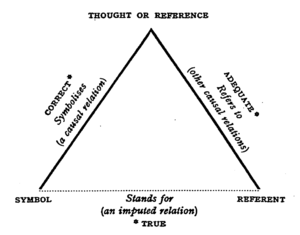
The SKOS-XL extension to the W3C’s SKOS standard for vocabulary management adds flexibility in how you track concept names, but it adds complexity and potential confusion that are rarely, if ever, worth it. 

What is the appeal of SKOS-XL? Information modelers wanting to separate concepts (so-called conceptual ideas) from terms (the names people use for concepts) often base their thinking on the model of Semiotic Triangle http://en.wikipedia.org/wiki/Triangle_of_reference or Peirce’s Triangle. Sometimes also called a triangle of meaning, this philosophy distinguishes a concept that exists in a human mind—a thought—from how it is referred to and from a symbol that evokes it. 


A referent is understood as a word. A symbol is typically explained as a pictorial depiction. A key aspect of this theory is its focus on human cognition. It postulates that there can be no name or identity intrinsic to a concept as it only exists as a thought in a human mind.

The challenge of applying this thinking to information modeling is that, ultimately, in information modeling we must commit everything to paper, electronic or otherwise. Thus, every concept must have an identity and a name. As a result, a separate model for concepts and terms where terms themselves have identity, names, relationships and are tracked separately from concepts is typically an over-complication that does not deliver practical value. For one thing, even explaining to a business audience a difference between a concept and a term is not simple. Colloquially, these words are often used interchangeably. Once explained, distinguishing and keeping track of these on an ongoing basis, when both “concepts” and “terms” are more often than not named using the same words, can be mind boggling. 

SKOS takes a simpler and what we believe to be a more practical approach to information modeling. It provides a way to describe concepts by giving each one:
  •  A globally unique identity
  • A preferred label that is unique for a human language (such as English or German) within a scope of a particular “concept scheme”. It is called skos:prefLabel.
  • Any number of alternative labels called skos:altLabel. Concept's alternative labels in a given language should not be the same as its preferred label in this language.
  • Whatever other properties (attributes and relationships) are deemed necessary:
  • SKOS supplies some standard relationships such as skos:broader, skos:related and skos:exactMatch and a number of annotations that are thought to be universally useful such as skos:definition and skos:editorialNote.
  • Users of SKOS are free to add properties specific to their domain. For example, when using SKOS to describe different companies, a user may want to add a stock ticker field.

If needed, metadata about labels can be captured without giving them identity of their own. TopBraid EVN is a good example of a tool that offers this capability. Besides the language part, such metadata is typically not just about the label itself, but about its relationship to the concept—for example, who said that this is a preferred label for this concept and when. All the relationships are between concepts, not between the labels.

The W3C has published an optional extension to SKOS called SKOS-XL (SKOS eXtension for Labels) that accommodates those who want to give separate identity to concepts and terms. It does not use the word “term”—presumably, because informally terms are often understood as concepts and vice versa. Instead it introduces a class Label explained as a “lexical entity”. While the extension is small with only one new class and five new properties, its implications are far-reaching. As a result, providing tool support for SKOS-XL is considerably more complex than for SKOS proper. 

Following the SKOS-XL model, labels are not strings as in SKOS proper, but RDF resources with their own identity. Each label can have only one literal form; this is where the actual text string (the name) goes. The literal form is not one per Label per language as with SKOS’s constraint for assigning preferred labels, but one per Label. So, to accommodate different languages, different label resources must be created. At the same time, there can be multiple Label resources with the same literal form (for example, two different Label resources with the literal form “Mouse”). Even a simple SKOS-XL vocabulary is considerably bulkier than its SKOS alternative. Since SKOS-XL format takes far more more space, storage, import/export and performance of search and query can become an issue for larger vocabularies.

Concepts are connected to Labels by relationships that indicate preferred (skosxl:prefLabel) and alternative Labels (skosxl:altLabel) for a Concept. There is no cardinality restrictions on these relationships–that is, a Concept can be linked to multiple Labels using skosxl:prefLabel link. Labels can be linked to each other using skosxl:labelRelation relationship. These links are separate from the relationships between Concepts.

Direct use of SKOS properties that associate label strings with Concepts can be tricky when using SKOS-XL. According to SKOS-XL label strings for Concepts are derived using rules such as:

The property chain (skosxl:prefLabel, skosxl:literalForm) is a sub-property of skos:prefLabel

This means that if there is a Label ex:Label1 with literal form “love” and a Concept ex:Concept1 where ex:Concept1 connects to ex:Label1 using a skosxl:prefLabel relationship, we can conclude that ex:Concept1 has a skos:prefLabel  value of “love”.  Since simultaneously keeping the integrity of directly entered and inferred values is problematic, any tool supporting SKOS-XL must protect the user from directly entering label strings for Concepts. This makes it difficult to use the same tool to edit for SKOS and SKOS-XL vocabularies, especially if users want to intermix different vocabulary formats. 

Furthermore, a user will see the same text label for different entities. This will be not only because different Labels can have the same literal forms, but also because the Concept resources “inherit” string labels from the associated Label resources. This can easily lead to confusing results.

There are also various integrity clashes between SKOS and SKOS-XL. For example:

1.       Two different preferred labels in the same language

ex:Concept1skosxl:prefLabelex:Label1; skosxl:prefLabelex:Label2.
ex:Label1 skosxl:literalForm "love"@en .
ex:Label2 skosxl:literalForm "adoration"@en .

This is not “wrong” according to SKOS-XL because a Concept can be connected to multiple Labels using the skosxl:prefLabel relationship. But, it means that ex:Concept1has skos:prefLabel values of both "love"@en and "adoration"@en. This is a violation of SKOS constraint S14, which prohibits a concept from having more than one preferred label string in a given language.
2.        
      Clash between preferred and alternative labels

ex:Concept1skosxl:prefLabel ex:Label1; skosxl:altLabel ex:Label2
ex:Label1 skosxl:literalForm "love"@en .
ex:Label2 skosxl:literalForm "love"@en .

Again, this is not “wrong” according to SKOS-XL because different Labels can have the same literal form, but it’s a problem for SKOS because it implies identical English language preferred and alternative label strings for ex:Concept1.

Without a doubt, these issues play a role in the fact that while the use and tool support for SKOS is growing, there are few if any tools for SKOS-XL or published SKOS-XL vocabularies. An even more important factor is the lack of compelling business value that would justify SKOS-XL complexity. Having talked to a wide range of users working on business vocabularies, we have yet to hear a use case that cannot be supported by SKOS alone.

Does SKOS-XL look like the only viable approach to your vocabulary management needs? Let’s discuss it—maybe we can help you find a simpler solution.

Tuesday, May 29, 2012

New white paper: Controlled vocabularies, taxonomies, and thesauruses (and ontologies)

What's the difference between a controlled vocabulary, a taxonomy, a thesaurus, and an ontology? We've found people using some of these terms interchangeably, and it's difficult to find reliable official definitions for each.
We've come up with some unofficial working definitions that have served us well when discussing different kinds of controlled vocabularies and their associated metadata. Our new white paper Controlled vocabularies, taxonomies, and thesauruses (and ontologies) describes each of these and which TopQuadrant products give customers the control they need over the kinds of vocabularies and metadata that they're working with.
We hope that this short white paper gives you a better idea of why people build, use, and store controlled vocabularies and the advantages that standards bring to this work.
Roget's Thesaurus

Sunday, May 13, 2012

Data cathedrals versus information bazaars?

Enterprises create data cathedrals with an enforced dogma to control data purity, causing much information to be outside its walls where informal information bazaars thrive. These information bazaars have suspect quality, uncertain provenance, yet are responsive to users’ needs. Metcalf's law suggests that the benefit gained from integrated information grows geometrically1 with the number of data communities that are integrated. How can we balance the dogma of the data cathedrals and the spontaneity of the information bazaar?


Enterprise's database cathedrals reflect corporate dogma. Nothing gets changed without approval from high. Change is very slow. New databases orders get integrated only after a considerably long time assuming that the new data is 100% squeaky clean. So there are a lot of databases that are entirely outside the database cathedrals' walls. Badly behaved sources of data might even be excommunicated.
Where does the other data go? It is not as though this other data does not exist, although many would like to pretend it to be so. Instead they are all in the information bazaar. Anyone with any information can set up their own information stall, and store their own data in Excel, Access, anywhere they want. They only specialize in their own data for their own use. This data is pretty good because that is all they need for their business. They share well with others but on a barter basis. In fact the information bazaar is chaotic, but lively, always changing to users’ demands, and a fun place to be. 

Why do we have the conflict between the database cathedral and the information bazaars?

The data cathedral offers security, quality, and good provenance. It provides the system of record for users who then should have complete confidence in their decision making. It does this using accurate relational models capturing enterprise information. But a relational model is designed by the cathedral hierarchy based on the closed model: only pure data can be entered into the database; impure data can lead to excommunication. 
The information bazaar has few rules of entry. As demonstrated by the web, it allows anyone to say anything about anything (AAA). Even with this deficiency we will regularly search the web to help us with our decision making, not exploring sources that are suspect, and filtering information that we feel lacks accuracy until we end up with information to support our decision.

Can we resolve these conflicting objectives?

Can we expect the cathedral hierarchy to relax its admittance criteria to let in as much of the information bazaar as possible? Somewhat, but we cannot expect miracles.
Can we expect the information bazaar to become more sober and responsible so that it can securely provide information with guaranteed quality and provenance? Somewhat, but we cannot expect an evangelical conversion?
Really this is not optimal, because the benefit of having data integrated grows geometrically with the number of interconnected sources, yet the database cathedral cannot grow because the information bazaar does not meet their purity dogma.

So how can these conflicting objectives be redeemed?

One path to redemption is to unite the information bazaar through a common semantic model. This allows all information to be available within a universal graph (model). Of course some riff-raff will get in, but again that is an advantage for the semantic model as you can also declare rules that will verify the accuracy of the data even though it is already stored. 
At the same time the data cathedral can continue to expand, hopefully at faster pace, by integrating those graphs that meet their criteria. 
However we allow users to access both the data cathedral, from where they can obtain the system of record, and information bazaar. We could even report results federating form the two data-sources annotating that information from the information bazaar with its provenance and hence less certain data quality. Doing this in a standards compliant way turns existing enterprise information resources into connectable, responsive and interoperable semantic assets.

Harmony

Using this approach we don’t need to force the data cathedral to relax its dogma, nor do we ask the information bazaar to shut down. Yet we can offer users access to 99% of the enterprise information providing users the 'Metcalf'1 benefits of full integration. As semantic assets grow and connect, they enable a resilient semantic ecosystem of meaningful interactions between people, applications and data irrespective of the differences in structures, data schemas, governance and technologies. The dividing boundaries between the cathedral and the bazaar no longer need to be obstacles to information users. Semantic ecosystem seamlessly embraces and provides integrated access to data cathedrals and information bazaars alike.

1 If I have 10 database systems running my business that are entirely disconnected, then the benefits are 10 * K, some constant. If I integrate these databases in pairs (operations + accounting, accounting + payroll, etc), then the benefits increase to 10 * K * 2. If I integrate in threes, (operations + accounting + maintenance, accounting + payroll + receiving, etc), then the benefits increase four-fold (a corollary of Metcalf's law) to 10 * K * 4. For quad-wise integration my benefits would be 10 * K * 8 and so on. Now it might not be 8 fold but the point is there is a geometric, not linear, growth in benefits as I integrate all of my information across my organization.

Monday, April 30, 2012

Can semantic technology melt process industry’s icebergs of information?


Icebergs of information loiter throughout process manufacturing IT waiting to sink any information integration project. The impact of semantic technologies is being felt in medicine, life sciences, intelligence, and elsewhere but can it solve this problem in process manufacturing? The ability to federate information from multiple data-sources into a schema-less structure, and then deliver that federated information in any format and in accordance with any standard schema uniquely positions semantic technology. Is this a sweet spot for semantic technologies?

Process Manufacturing Application Focus over the Years

Over the years we have been solving problems within process manufacturing IT only to uncover more problems. Once the problem was that of measurement data in silos which was solved by the introduction of real-time data historians. However that created the problems of data visibility, solved by the introduction of graphical user interfaces. This introduced data overload which was partially solved by the introduction of analytical tools to digest the information and produce diagnostics. Unfortunately these tools were difficult to deploy across all assets within an organization, so we have been trying to solve that problem with information models. The current problem is how to convert the diagnostics into actionable knowledge with the use of work-flow engines and ensuring the sustainability of applications as solutions increases in complexity.
Process Manufacturing Application Problems and Solutions over the Years
1985-
1995
1990-
2000
1995-
2005
2000-
2010
2005-
2015
2010-
Problem
Measurement data in silos
Data access and visualization
Analysis and business intelligence
Contextualized information
Consistent actioning
Sustainability
Industry
Response
Real-time databases collecting measurements
(proprietary)
Graphical user interfaces, trending and reporting tools
(proprietary)
Analytical tools to digest data into information and diagnostics
Plant data models (ProdML, ISA-95, ISO15926, IEC 61970/61968, Proprietary)
ISO-9001
Outsourcing
Standards
Consequence
Data but no user access
Data overload
Deployability of analysis to all assets
Interpretation limited to experts
Complexity, much more than RTDB, limiting sustainability
Improved ongoing application benefits

However it is not only the increased technological complexity that is causing problems. Business decisions now cross many more business boundaries. When measurement data was trapped in silos we were content with unit-wide or plant-wide data historians. Now a well performance problem might involve a maintenance engineer located in Houston accessing a Mimosa[1]-based maintenance management system, an operations engineer located in Aberdeen accessing an OPC-UA[2]-based data historian, a production engineer located in London accessing a custom system driven by WITSML[3]-based feeds, and a facilities engineer using an ISO-15926[4] facilities management model. Not only are the participants in different locations and business units, but they also rely on different systems using different models to support their decision making. However they all should be talking about the same well, measured by the same instruments, producing the same flows, and processed by the same equipment.
The problem is that these operational support systems are not simply data silos whose homogeneous data we need to merge into one to answer our questions. In fact these operational support systems are icebergs of information. Above the surface they publish a public perspective focused on the core operational function of the application. However this data needs context, so below the surface is much of the same information that is contained in other systems. This information provides the context to the operational data so that the operational system can perform its required functions. For example the historian needs to know something about the instruments that are the source of its measurements; maintenance management systems need to know not only about the equipment to be maintained but the location of that equipment, physically and organizationally.

Figure 1: Icebergs of Information
Icebergs of information are not limited to the operational data stores deployed in organizations. An essential practice in these days of interoperability requirements is the adoption of model standards. However even these exhibit the same problems as shown by the diagram below. This diagram maps the available standards to its focus within the hydrocarbon supply chain.

Figure 2: Multiple Overlapping Model Standards
Increasing regulatory and competitive demands on the business are forcing decision making to be more timely, and to be more integrated across the traditional business boundaries. However these icebergs are getting in the way of effective decision making.
One way to make any or all of this information available to consumers is to create the bigger iceberg. ‘Simply’ create the relational database schema that covers every past, current, and future business need, and build adapters to populate this database from the operational data stores. Unfortunately this mega-store can only get more complex as it has to keep up with an expanding scope of information required to support the decision making processes.

Figure 3: Integration using the Bigger Iceberg
Alternatively we can keep building data-marts every time someone has a different business query.  However these do not provide the timeliness required to support operational decision making.

The Need for a Babel-Fish

We cannot meet the needs of the business, and solve their decision making needs by having one mega-store because it will never keep up with the changing business requirements. Instead we need a babel-fish (with thanks to the Hitchhikers Guide to the Galaxy).
This babel-fish can consume all of the different operational data in different standards, and translate them into any standard that the end-consumer wants. Thus the babel-fish will need to know that OPC UA's concept 'hasInstrument' has the same meaning as Mimosa's concept of 'Instrumented'. Similarly 10FIC107 from an OPCUA provider is the same as 10-FIC-1-7 from Mimosa.
1.       Information providers (operational data stores) within the business will want to provide information according to their capabilities, but preferably using the standards appropriate for their application. For example measurements should be OPC UA, maintenance should use Mimosa
2.       Information consumers will want to consume information in the form of one or more standards appropriate for their application.

Figure 4: Integration babel-fish

The Semantic/RDF model comes to the rescue

First of all a definition: a semantic model means organizing all data and knowledge as RDF triples {subject, property, object}. Thus {:Peter, :hasAge, 21^^:years}, and {:Pump101, :manufacturedBy, :Rotek} are examples of RDF triples. RDF triples can be persisted in a variety of ways: SQL table, custom organizations, NoSQL, XML files and many more. If we were designing relational database to hold these RDF triples we would only have one ‘table’ so it may appear that we have no schema, in the relational database design-sense when we have key relationships to enforce integrity, and unique indices to enforce uniqueness. However we can add other statements about the data such as {:Pump101, :type, :ReciprocatingPump} and {:ReciprocatingPump, :subClassOf, :Pump}[5]. Used in combination with a reasoner we can infer consequences from these asserted facts, such as :Pump101 is a type of :Pump, and Peter is not a :Pump, despite rumors to the contrary.   These triples can be visualized as the links in a graph with the subject and object being the nodes of the graph, and the property the name of the edge linking these nodes:

Figure 5: RDF Triples as a graph
Over the years, new modeling metaphors have been introduced to solve perceived or actual problems with their predecessors. For example the Relational Model had perceived difficulties associated with reporting, model complexity, flexibility, and data distribution. A semantic model helps solve these problems.

Figure 6: Evolution of Model Metaphors

·         In response to the perceived reporting issues, OLAP techniques were introduced along with the data warehouse. This greatly eased the problem of user-reporting, and data mining. However it did introduce the problem of data duplication.
o   A semantic model can query against a federated model in which information is distributed throughout the original data sources.
·         In response to the perceived complexity issues, various forms of object-orientated modeling were introduced. There is no doubt that it is easier to think of one’s problem in terms of an object model rather than a complex relational or ER model, especially when there are a large number of entities and relations.
o   The semantic model is built around the very simple concept of statements of facts such as {:Peter, :hasAge, 21^^:years}, and {:Pump101, :manufacturedBy, :Rotek} combined with statements that describe the model such as {:Pump101, :type, :ReciprocatingPump} and {:ReciprocatingPump, :subClassOf, :Pump}.
·         The model flexibility problem occurs when, after the model has been designed, the business needs the model to change. In response to this flexibility issue, the choice is to make the original model anticipate all potential uses but then risk complexity, or use an object-relational approach in which it is possible to add new attributes without changing the underlying storage schema.
o   In semantic models these relationships are expressed in triples, using RDFS, SKOS, OWL, etc. Thus RDF is also used as the physical model (in RDF stores, at least).
·         There have been various responses to data distribution.
o   In the relational world there is not much choice other than to replicate the data from heterogeneous data stores using Extract-Transform-Load (ETL) techniques. In the case of homogenous but distributed databases distributed queries are possible, although it does require intimate knowledge of all the schemas in all of the distributed databases.
o   In the object-orientated world we are in a worse situation: it is very difficult to manage a distributed object in which different objects are distributed or attributes are distributed.
The good news is that a semantic approach is the ideal (or even the only) approach that can solve the information integration problem as follows:
1.       Convert to RDF normal form: Convert all source data into RDF. The data can be left at source and fetched on demand (federated) or moved into temporary RDF storage
    • There are already standard ways of doing this for any spreadsheet, relational database, XML schema, and more. For example, TopBraid Suite (http://www.topquadrant.com/products/TB_Suite.html) provides converters and adaptors for all common data sources. It is relatively easy to create more mappings such as OPCUA. The dynamic adapters act as SPARQLEndpoints[6].
2.       Federated data model: Create 'rules' that map one vocabulary to another.
    • The language of these rules would be RDFS, SKOS and OWL. For example you can declare {OPCUA:hasInstrument, owl:sameAs, Mimosa:Instrumented}. Note that these are simply additional statements expressed in RDF which are then used by a reasoner to infer the consequences such as :FI101 is actually the same as :10FIC101.
    • More sophisticated rules can also be created using directly RDF and SPARQL. For some examples, see SPIN or SPARQL Rules at http://spinrdf.org/ and http://www.w3.org/Submission/2011/SUBM-spin-overview-20110222/
3.       Chameleon data services: Create consumer queries that extract the information from the combined model into the standard required using SPARQL queries.
    • For example even though all instrument data is in OPCUA, a consumer could use a Mimosa interface to fetch this data. The results can then be published as web-services for consumption by external applications using SPARQLMotion (http://www.topquadrant.com/products/SPARQLMotion.html)

Figure 7: Federation End-to-End

Let’s look into these steps in detail:

Convert to RDF normal form

Despite the fact that data will be stored in different formats (relational, XML, object, Excel, etc) according to different schemas they can always be converted into RDF triples. Always is a strong word, but it really does work. There are already ways of doing this for any spreadsheet, relational database, XML schema, and more and it is relatively easy to create more mappings such as OPC-UA. The data can be left at source and fetched on demand (federated) or moved into temporary RDF storage. For example, TopBraid Suite (http://www.topquadrant.com/products/TB_Suite.html) provides converters and adaptors for all common data sources.

Figure 8: Conversion to RDF Normal Form

Federated Data Model

A federated data model allows different graphs (aka databases) to be aggregated by linking the shared objects. This applies to real-time measurements (OPC-UA), maintenance (MIMOSA), production data (ProdML), or any external database. We can visualize this as combining the graphs of the individual operational data stores into a single graph.
Of course there will be vocabulary differences between the different data-sources. For example, in the OPC-UA data-source you might have a property OPCUA:hasInstrument, and in a MIMOSA data-source the equivalent is called Mimosa:Instrumented. So the federated data model incorporates 'rules' that map one vocabulary to another. The language of these rules would be RDFS, SKOS, and OWL. For example, in OWL, you can declare {OPCUA:hasInstrument owl:sameAs Mimosa:Instrumented}. Note that these are simply additional statements expressed as RDF triples which are then used by a reasoner to infer consequences such as :FI101 is actually the same as :10FIC101.
There will also be identity differences between the different data-sources. These can also be handled by additional statements, such as {:TANK#102, owl:sameAs, :TK102 }. This allows a reasoner to infer that the statement {:TK102, :has_price, 83^^:$} also applies to :TANK#102, implying {:TANK#102, :has_price, 83^^:$}.

Figure 9: Information Federated from MulTiple Datasources

Chameleon Data Services

To extract information from the federated information, the best choice is SPARQL, the semantic equivalent of SQL only simpler. Whilst SQL allows one to query the contents of multiple tables within a database, SPARQL matches patterns within the graph. With SQL we need to know in which table each field belongs. With SPARQL we define the graph pattern that we want to match, and the query engine will search throughout the federated graphs to find the matches. In the example illustrated below we do not need to know that the price attribute comes from one data source, whilst the volume comes from another. In fact SPARQL allows even further flexibility. The price attribute for Tank#101 could come from a different data source than the price attribute for Tank#102. This is part of the magic of the semantic technology.
  Figure 10: Graph Pattern matching with SPARQL
SPARQL can be used to directly query the federated graph for reporting purposes, however most consumers of the information will expect to interface to a web-service, with SOAP or REST being the most popular. These services do not have to be programmed. Instead they can be declared using SPARQLMotion (http:www.sparqlmotion.org) to produce easily consumed and adaptable web-services. The designer for SPARQLMotion is shown below:

Figure 11: Example SPARQLMotion

Semantic/RDF advantages for the Process Manufacturing

Despite solving a complex data integration problem, Semantic/RDF is inherently simpler. Can there be anything simpler than storing all knowledge as RDF triples?  Despite this simplicity, we do not lose any expressivity.
There is no predefined schema to limit flexibility. However the schema rules, encoded as tables and keys in the relational model, can still be expressed using RDFS, OWL, and SKOS statements.
Deconstructing all information into statements (triples) allows data from distributed sources to be easily merged into a single graph.
Any information model can be reconstructed from the merged graph using SPARQL and presented as web-services (SOAP or REST).


[1] MIMOSA is a not-for-profit trade association dedicated to developing and encouraging the adoption of open information standards for Operations and Maintenance in manufacturing, fleet, and facility environments. MIMOSA's open standards enable collaborative asset lifecycle management in both commercial and military applications.
[2] The Unified Architecture (UA) is THE next generation OPC standard that provides a cohesive, secure and reliable cross platform framework for access to real time and historical data and events. 
[3] WITSML™ (Wellsite Information Transfer Standard Markup Language) is an industry initiative to provide open, non-proprietary, standard interfaces for technology and software that monitor and manage wells, completions and workovers.
[4] ISO 15926 provides integration of life-cycle data for process plants including oil and gas production facilities

[5] I should really be using URIs instead of text labels for subject, property, and objects, but the intent of the semantic model is conveyed more simply if we avoid identifiers like ‘http://www.example.org/equipment#Pump101’ and use :Pump#101
[6] SPARQL is a query language for RDF. A SPARQL endpoint is a protocol service that makes it possible to query a data source using SPARQL. The source itself does not need to be in RDF. It can, for example, be a traditional relational database. Later in this article we will describe SPARQL in more detail and show some query examples.

Friday, December 2, 2011

Publishing HTML created with SPARQL Web Pages

Last week we saw how to use SPARQL Web Pages (SWP) to render customized HTML of individual class instances and how to create a web page of all that class's instances with a title at the top. The fine-grained control that SWP gives us over the generated HTML let us take advantage of the jQuery Mobile libraries so that the sample TopBraid application generated web pages appropriate for a smartphone interface, with buttons that expand and collapse at your touch to display details about each class instance.

Testing this application meant choosing from two alternatives:

  • The first was to run it on TopBraid Composer's built-in TopBraid Live Personal Server, which let us look at the page from any web browser running on the same machine.

  • Uploading the application's project to a TopBraid Live Enterprise Server, where multiple devices, including phones, could access it.

Either way, because TopBraid Live generates these web pages dynamically, if the underlying data is changed, refreshed versions of the web page would reflect this, making TopBraid a great platform for interactive semantic web applications for any device.

You don't have to have a TopBraid Live Enterprise server to deliver pages generated by SWP, though. A simple SPARQLMotion script can save your formatted HTML in disk files that you can copy to a web server that may or may not have TopBraid Live installed. Using this technique, you can use the TopBraid platform to create semantic content publishing applications as well as interactive applications.

The following SPARQLMotion script, which is stored in the application file described last week, does this for the mobile Kennedys web application.

mobile Kennedys app SPARQLMotion script

The first module is an sml:ImportRDFFromWorkspace module that reads the file that this script is stored in. That file has the Kennedys data and the SWP formatting markup so that this data can be fed to the next step in the process.

The second module, named mk:GenerateHTML, is an sml:CreateUISPINDocument SPARQLMotion module (from the Text Processing section of the SPARQLMotion palette) whose key setting is its sml:view property, which has the following:

<ui:resourceView
ui:resource="&lt;http://topbraidlive.org/mobileKennedys&gt;"/>

It's a snippet of XML specifying that the module should create a resource view for the specified resource, which is identified here with a complete URI. (The URI's delimiting angle brackets are escaped because they're in an XML attribute.) The real work to make this happen was all described in the last blog entry, which showed how the SWP code to generate a complete web page was attached to the resource. The mk:GenerateHTML module in this script also specifies that this generated markup will be stored in a variable named doc.

The final mk:SaveFile module in the script is an sml:ExportToTextFile module that saves the contents of the doc variable (set in the module's sml:text property as the SPARQL expression ?doc) to a file called output.html. I also set sml:replace to true so that repeated execution of the script wouldn't append the output onto the result of previous runs.

After you run this script you'll have a web page called output.html that looks like the display shown in the phone browsers in last week's blog entry, and you can copy this file to any web server you want.

This script is very simple. As you bring other SPARQLMotion capabilities into it such as inferencing and reading from all the data formats that TopBraid understands, you can make it much more sophisticated. You can also configure the script to save a collection of multiple files, letting you publish large collections of data in pieces that are digestible for typical browsers. (Phone browsers in particular can get sluggish; my Android LG Ally is not a recent model, and the expanding and collapsing of information about each person on the display of this app is not as quick on the Ally as I'd like it to be.)

So, use your imagination to add new features to this SPARQLMotion script, and you can create dynamic or static web pages for phones or any other kinds of browsers, with all the power of TopBraid behind your application development.

Tuesday, November 22, 2011

Creating a TopBraid mobile web app with SPARQL Web Pages

I've written here before about how SPARQL Web Pages (SWP) let you convert your RDF to HTML or XML by embedding SPARQL queries into the appropriate markup. In that very simple example, I showed how to create a web page for an address book entry and then display it both in TopBraid Composer and in a regular web browser.

Today I'm going to show how I did something similar to display a single Person instance from the Kennedys sample data included with TopBraid Composer and then defined a page that showed all the people in that data model. You can download and try the project here. The fun part was displaying it so that it looks like a proper mobile web page on a phone's web browser, as shown here on an Android phone and on an iPhone turned sideways to test the re-orienting capability of the display.

app output on LG Ally and iPhone


Touching someone's name on the phone expands the display to show the remaining property names and values about that person underneath his or her name. In the picture, I've just touched Andrew Cuomo's name on the Android phone and Edward Kennedy Jr's name on the iPhone, displaying details about each of them below their names. Touching the names again hides their data.

In the picture, the two phone browsers are displaying the output of a TopBraid Live server running this application. As we'll see in the sequel to this blog entry, you can use the same SPARQL Web Page configuration to save HTML disk files with all of this formatting so that the phone browsers could view the static web pages stored on a server that didn't have TopBraid Live installed.

To enable proper mobile display, I used the jQuery Mobile library. jQuery is a set of Javascript and CSS libraries designed to let you add sophisticated user interfaces to your web pages without worrying about cross-browser compatibility, and jQuery Mobile is a branch of this project specialized for mobile phones. You don't need to know any JavaScript or CSS to use these libraries; if you're happy with one of their display configuration, using these libraries is usually just a matter of including the right file links in your HTML's head element and then setting certain attributes in your HTML elements to reference the libraries.

I began this application by creating an RDF/SPARQLMotion file in TopBraid Composer with a base URI of http://topbraidlive.org/mobileKennedys. I needed SPARQLMotion for the script that creates the static disk file version of the Kennedys display that we'll learn about next week. Next, I imported the kennedys.rdf model from the /TopBraid/Examples folder in the Navigator view. I also imported the SWP html.rdf and tui.rdf models from the Navigator's /TopBraid/UISPIN folder. (This all works the same when the files to import are Turtle ttl files instead of RDF/XML files.)

After importing the necessary files, the next step was to set up the display of data about a Person instance. After importing the files described above, clicking on kennedys:Person under owl:Thing on the Class view shows that the presence of the SWP libraries has added a ui:instanceView property to the kennedys:Person class form. I could have put the HTML to display a person here, like I did with the address book display in the blog entry mentioned above, but for greater flexibility, I created a separate PersonView class to store this markup and pointed at this class from the Person class's ui:instanceView value.

I created this mk:PersonView class (I had assigned the prefix "mk:" to the URI http://topbraidlive.org/mobileKennedys#) as a child of the ui:Element class, which is a child of the ui:Node class added by the SWP libraries. The ui:prototype property on this class's form is the place for the formatting code and markup, but I did a few setup steps before setting it:

  • Because the app needs to pass a parameter to the code in ui:prototype specifying which person to display, I had to define that parameter. To do this, I created an sp:person child of the sp:arg property in the Properties view to represent the person argument value passed to the prototype. Next, I dragged the new property from the Properties view to the spin:constraint property name on the mk:PersonView form to indicate that this would store the argument passed to the code and markup used to display a single person. This displays the "Create from SPIN template" wizard with all the values filled out the way I needed them, so I just clicked the OK button.

  • JQuery implements some of its magic with HTML extension attributes named data-collapsed and data-role. TopBraid Composer helps you assemble proper HTML by flagging any non-HTML markup, and it won't like these because they're not declared as HTML 4 properties. So, I declared them myself by making two clones of the html:class property (a subproperty of html:attributes) and renamed them html:data-collapsed and html:data-role. This way, TopBraid Composer wouldn't prevent me from saving HTML markup that used these properties as attributes.

  • When listing each person's property names and values (for example, Andrew Cuomo's year of birth and first name in the picture above), I certainly didn't want to list the full URI of each property name. Ideally, each property would have an rdfs:label value that I could display instead; if not, I thought it best to just show the local name of the property's URI. To make this easier, I created a new function called mk:bestName as a subclass of spin:Functions (itself a subclass of spin:Modules). I defined a spin:constraint of sp:arg1 for this function and then defined this spin:body for it:

    SELECT ?label
    WHERE {
    BIND (spif:name(?arg1) AS ?name) .
    BIND (IF(fn:contains(?name, ":"), afn:localname(?arg1), ?name) AS ?label) .
    }

    mk:bestName is a good general-purpose function. It calls the SPIN spif:name function, which gets a resource's skos:prefLabel value if available or an rdfs:label value as a second choice. If neither is available, mk:bestName takes the local name of the URI or prefixed name that got returned.

  • Because members of the kennedys:Person class might have a kennedys:name value that I'd prefer the application to use if available, I declared a similar but more specialized function for the Kennedys data called mk:bestKennedyName. This is also as a subclass of spin:Functions, and has a spin:constraint of sp:arg1 and the following as a spin:body:

    SELECT ?label
    WHERE {
    OPTIONAL {
    ?arg1 kennedys:name ?kname .
    } .
    BIND (spif:name(?arg1) AS ?name) .
    BIND (COALESCE(?kname, IF(fn:contains(?name, ":"), afn:localname(?arg1), ?name)) AS ?label) .
    }}

    This function body takes advantage of SPARQL 1.1's new COALESCE() function, which returns the value of the first parameter passed to it that can be evaluated without an error.

With the functions, the HTML extensions, and the argument to pass to it all set up for the formatting markup in the mk:PersonView class, I was ready to add that markup and SPARQL code to the ui:prototype property of my new class. It's mostly HTML div elements with attributes set according to the models I saw in the source of the jQuery Mobile demos. The "collapsible" part means that initially only the kennedys:name value will display, as an h3 element, and that clicking on that name (or, on a phone, touching it) will toggle the display of the remaining property names and values about that person.

<div data-collapsed="true" data-role="collapsible">
<h3>{= spl:object(?person, kennedys:name) }</h3>
<div class="ui-grid-a">
<ui:forEach ui:resultSet="{#
SELECT ?propertyName ?bestValueLabel
WHERE {
?person ?property ?value .
BIND (mk:bestName(?property) AS ?propertyName) .
BIND (IF(isIRI(?value), mk:bestKennedyName(?value), ?value)
AS ?bestValueLabel) .
}
ORDER BY (?property) }">
<div class="ui-block-a">
<div class="ui-bar ui-bar-c">{= ?propertyName }</div>
</div>
<div class="ui-block-b">
<div class="ui-bar ui-bar-c">{= ?bestValueLabel }</div>
</div>
</ui:forEach>
</div>
</div>

When you use SWP to define an HTML div element with the data and markup to display something, the SWP engine will create html, head, and body wrapper elements to ensure that a browser viewing the HTML gets a complete web page. The SWP ui:headIncludes property, which you'll see on the mk:PersonView class form with ui:prototype and the other properties there, lets you specify custom markup to add to the HTML head element when the SWP engine sends the web page to the requesting browser. I added the following to this property; it has the meta, link, and script elements necessary to make the resulting HTML a proper jQuery Mobile page:

<ui:group>
<meta content="width=device-width, minimum-scale=1.0, maximum-scale=1.0"
name="viewport"/>
<link href="http://code.jquery.com/mobile/1.0/jquery.mobile-1.0.min.css"
rel="stylesheet"/>
<script src="http://code.jquery.com/jquery-1.6.4.min.js"/>
<script src="http://code.jquery.com/mobile/1.0/jquery.mobile-1.0.min.js"/>
</ui:group>

Then, going back to the kennedys:Person element, I added this ui:instanceView value for it to point at the mk:PersonView class I had created:

<mk:PersonView sp:person="{= ?this }"/>

The ?this variable passes the Person instance currently being processed to be used as the ?person value in the SPARQL query in the mk:PersonView ui:prototype value.

This is all enough to display a single person, but I wanted to display all the Person instances in a sorted list. I attached this view's definition to the ontology resource itself by clicking on the little house icon at the top of TopBraid Composer and then adding this ui:view value to it (note that ui:view wasn't already part of the form, so I dragged it on there from TopBraid Composer's Properties view):

<div>
<div data-role="header">
<h1>Kennedys List</h1>
</div>
<div data-role="collapsible-set">
<ui:forEach ui:resultSet="{#
SELECT ?p
WHERE {
?p a kennedys:Person .
?p kennedys:lastName ?lname .
}
ORDER BY (?lname) }">
<ui:resourceView ui:resource="{= ?p }"/>
</ui:forEach>
</div>
</div>

As with the code to display each individual Person instance, this markup is mostly div elements with attribute settings based on the source of the jQuery Mobile demos I saw. The ui:resourceView element inside the ui:forEach element tells the SWP engine to display the resource according to whatever view was specified for it. In this case, the resource is a kennedys:Person instance, because that's what the SPARQL here query binds to the ?p variable, so it will use the view defined earlier.

To test this, I sent a browser to the URL http://localhost:8083/tbl/uispin?_resource=http://topbraidlive.org/mobileKennedys. (URLs for SPARQL Web Page applications often include a &_base parameter to identify the graph of data to use—in this case, it would be &_base=http://topbraid.org/examples/kennedys—but that was unnecessary here because one of the first steps of creating the mobileKennedys model was dragging the Kennedys data onto its Include tab, so it already knew which data to use.) The _resource parameter tells it which resource to render, so I used my file's base URI here because that's where I attached the markup and SPARQL code to display the full web page. These and other parameters are described in the SWP documentation.

This should work with any browser. (I recently discovered that picking User Agent from Safari's Develop menu lets you set Safari to emulate a variety of other browser, including the mobile versions that run on the iPhone and iPad, which helped me to debug some early problems I had with getting the jQuery Mobile code right.) Because you can't access TopBraid Composer's built-in copy of the TopBraid Live Personal edition from a different computer, there's no way for a phone's browser to access this application when running it on TopBraid Composer, so I uploaded the project storing this application to a copy of TopBraid Live to do the test shown in the photograph above.

Next week, I'll show how I extended this application to save a static HTML file of the mobile web display of Kennedys data as an alternative to the TopBraid Live server's dynamic display. I could then copy that file to a web server that doesn't necessarily have TopBraid Live installed on it. Then, any computer or phone web browser can display it. For a preview of how it looks, send your phone's browser to http://www.topquadrant.com/resources/blog/k/—or, if you want a shorter URL to type on your phone, http://bit.ly/topqkm.

This is a blog by TopQuadrant, developers of the TopBraid Suite, created to support the pursuit of our ongoing mission - to explode strange semantic myths, to seek out new models that support a new generation of dynamic business applications, to boldly integrate data that no one has integrated before.